Scan2Flow

Scan 2 Flow

Every scan hits your workflow - instantly.

Scanning that plugs into Salesforce, SAP, and your automations - your CRM and ERP stay the source of truth.

In the browser, capture with the camera, a wedge scanner, or type codes manually when labels are worn or scanning is not an option. Route to your CRM, ERP, webhooks, Make, n8n, or Zapier. BYOD, no native app.

No installYour APIsWedge + camera
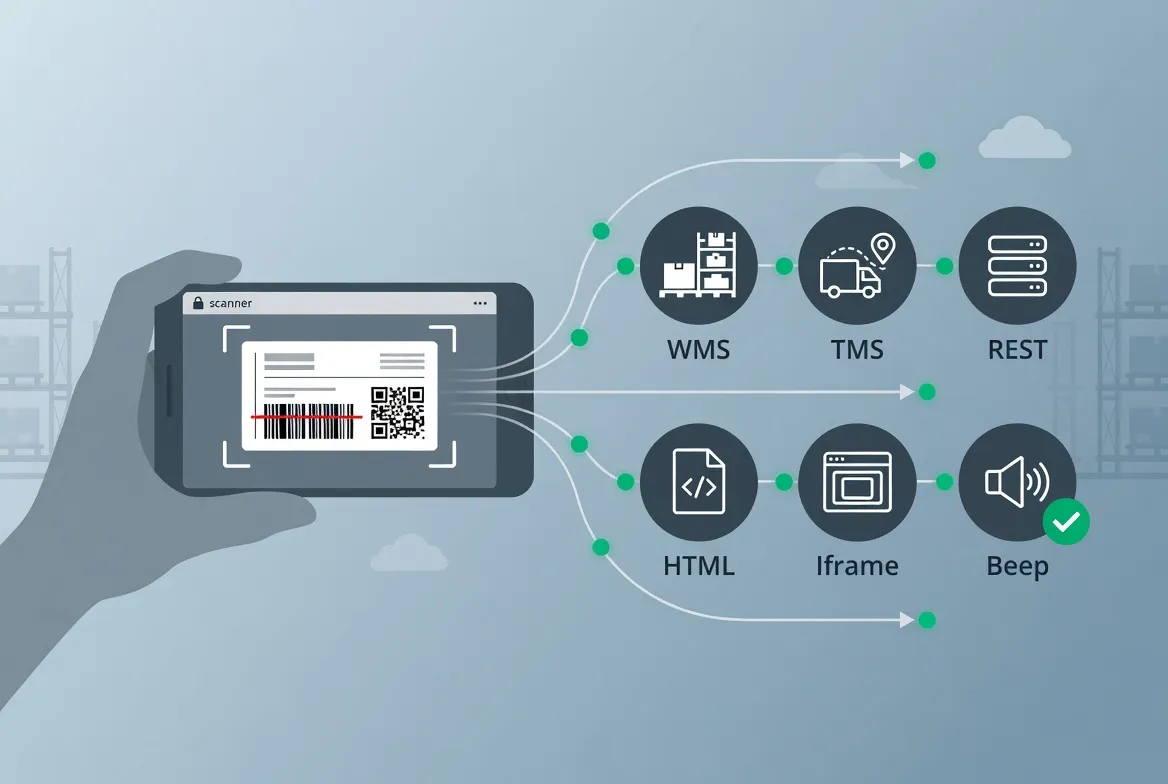
Scan barcodes and QR codes, then route data to APIs, links, HTML render, or iframe workflows

How It Works

1

Create a workflow

Define triggers and actions: HTTP API, URL, HTML render, iframe, or validation beep.

2

Select the workflow

Pick one enabled workflow on Scan so the next capture uses the right rules.

3

Scan or enter codes

Use the camera, a Bluetooth or USB scanner, or manual entry for QR codes and barcodes.

Demo workflows are on by default. Open Scan to test tickets, inventory, assets, and pharmacy flows. Use the demo data dashboard to view or edit sample rows, then scan the matching demo codes.

Features

Browser scanner: runs in Chrome, Firefox, Safari, and Edge with no app store install.

Flexible input: camera scanning, Bluetooth/USB scanners, and manual code entry.

Workflow actions: open URLs, call APIs, render HTML, show iframe responses, or play validation beeps.

Barcode API: decode images and generate QR codes for tickets, labels, and links.

Private by design: no accounts or database. Workflows stay local and scans go to your endpoint.

Demo ready: sample workflows and hosted data help you test flows quickly.

Supports common 1D and 2D formats, including QR, Data Matrix, Code 128, EAN-13, UPC, and more.API Reference

Roadmap

Manual entry / Bluetooth

Done

Type codes by hand or use Bluetooth and USB scanners as keyboard input.

Embeddable scanner

Planned

Host the scanner on your own pages so users stay on your site while they scan.

Built-in data tables

Planned

Tables in the app for data that is not only tied to a workflow. Edit rows without a full external API.

CSV export

Planned

Export scan results and history to CSV for spreadsheets or other tools.

Offline support

Planned

Queue scans when you are offline and sync or send them when the connection returns.

The dedicated barcode scanner alternative

Barcode integration often means hardware, SDKs, or custom apps. Scan 2 Flow keeps common workflows in the browser.

Traditional implementation

  • Dedicated scanners or app/SDK to buy and maintain
  • Complex setup: hardware config, field mapping, testing
  • Slow rollout before teams can test real scans

Scan 2 Flow implementation

  • Use any phone, tablet, or laptop camera as a browser barcode scanner.
  • Use Bluetooth or USB scanners as keyboard input when teams prefer hardware.
  • Enter codes manually when a label is damaged, off-screen, or hard to scan.

Lower costs with BYOD

Use phones, tablets, or scanners your team already has.

One browser workflow handles camera scans, scanner input, and manual entry, then sends data to your URL or API.

Connect to your tools

Send browser scans into the systems your team already uses.

Salesforce, HubSpot, Zoho CRM, Microsoft Dynamics, SAP, NetSuite, Google Sheets, Airtable, Zapier, Make.com, n8n, custom REST APIs, and more.

Why Scan 2 Flow

Compare setup, input methods, workflow actions, device cost, privacy, and testing speed.

FeatureScan2FlowDIY / CustomApp / SDK
SetupOpen the browser. No app, SDK, or account.Build and maintain scanner UI, routing, and hosting.Install app or manage device rollout.
Input methodsCamera, Bluetooth/USB scanner (keyboard wedge on desktop or handheld), manual entry, or browser on rugged Android.Depends on what you build.Often tied to app or hardware support.
Workflow outputsURLs, APIs, HTML render, iframes, validation beeps.Custom code for every action.Usually limited or vendor-specific.
BYOD costReuse phones, refurbished devices, and optional scanners; defer buying dedicated industrial handhelds when workflows stay in the browser.Possible, but you own development and support.Often needs managed devices or paid scanner hardware.
Dedicated terminals and new hardwareOptional: use BYOD, refurbished devices, PC scanners, or rugged Android in the browser. No custom app required.You own device strategy, drivers, and support for each class of hardware.Often assumes new rugged handhelds, MDM, and vendor or custom apps.
PrivacyWorkflows stay local. Scans go to your endpoint.You must design and audit the data flow.Depends on app/vendor storage and policies.
Demo and testingDemo workflows and sample data are ready by default.Requires test data, fixtures, and backend setup.Usually needs app setup before testing.

Use the devices you already have

Run workflows from phones, tablets, desktops with USB or Bluetooth scanners, or rugged Android devices in the browser. Dedicated terminals still make sense for harsh sites and heavy scan volume.

Frequently asked questions

Yes. Open the site and start scanning. No account is required.
No. It runs in the browser on phones, tablets, and computers.
They refer to the same product. Scan 2 Web describes browser scanning, Scan 2 Flow describes workflow actions, and Scan 2 API describes API routing.
Scanning happens in your browser. Scan results are not sent to our servers unless you use the optional API for server-side decoding. Workflows and settings are stored locally on your device. We do not collect personal data or track you. See our Privacy Policy for details.
Scan 2 Flow supports many 1D and 2D formats, including QR Code, Code 128, Code 39, EAN-13, EAN-8, UPC-A, UPC-E, ITF, Codabar, and more. You can enable or disable specific formats in Settings.
Yes. Send scans to any URL or API, including Make, n8n, Zapier, or your own endpoint.
Only in your browser's localStorage on this device. We do not store them on our servers. Clear site data or use Reset to wipe everything.
By design. No accounts or central database means less risk. Your settings stay local and scans go point-to-point.
Often no. Use phones, tablets, desktop scanners in keyboard-wedge mode, or rugged Android devices in the browser. Dedicated terminals still fit harsh sites and very high scan volume.
Yes. Choose external scanner mode on the Scan page and connect a USB or Bluetooth barcode scanner that sends characters like a keyboard (keyboard wedge). The scanned value runs through the same workflows as camera scans.